Archive for category: Blog Posts

Comparing The Benefits of IT Outsourcing to Its Potential Risks

Benefits of IT Outsourcing


Research indicates that 37% of small businesses outsource both accounting and IT services, and the numbers are only increasing. There are many reasons for this trend. Companies of all sizes view the benefits of IT outsourcing as a way to keep up with change. Technology demands change quickly, which requires skills that are expensive to maintain in-house.

“The main advantage that most clients see when they outsource IT services is basically the benefits of many IT professionals for the cost of one. The right IT partner gives you a predictable rate for a wide range of skills.” Peter Bertran, Chief Client Officer, DKBinnovative

IT outsourcing now plays a larger role in how organizations structure their operations and prepare for future technology needs. It influences how leaders plan budgets, shape internal roles, and manage long-term priorities. The approach also changes how companies think about accountability and service quality across different parts of their technology environment.

For these reasons and more, it’s important to understand the benefits and risks of IT outsourcing in detail. Some benefits and risks apply to all IT outsourcing agreements, but there are others that may be unique to your organization.

The rest of this blog will go over this subject. We will explore the key advantages and disadvantages of IT outsourcing, and how they may vary based on your organization and industry.


What Are The Key Advantages of Outsourcing IT Services?


1. Lower Operational Costs

Outsourcing IT services reduces spending on full-time staffing, training, and equipment. You gain access to a full team without the overhead of internal hiring. Clear pricing models help you plan technology costs with more accuracy. This creates a stable structure that supports smarter resource allocation.

According to CloudSecureTech, small businesses that switch from internal IT to outsourced IT services often report savings between 25% and 50% annually.

2. Broader Technical Expertise

An outsourced provider gives you access to specialists with skills across many areas of IT. You avoid the limits of a small internal team and receive guidance that supports both routine operations and complex projects. Providers stay current with new technologies, which helps you make stronger decisions about tools and upgrades. You receive expertise that adapts as your environment changes.

3. Improved Service Reliability

Outsourced teams offer structured processes that keep systems monitored and maintained. Issues receive attention quickly because providers staff teams that cover a wide range of technical needs. Service consistency improves because you work with a provider that follows defined workflows for support and escalation. This stability helps you keep operations running smoothly.

Outsource Your IT to a Team That Has a 98% Average Client Satisfaction Rating!

Start Here


4. Scalable Support

Outsourced IT services adjust to your needs as your organization grows or changes direction. You can add or reduce services without changing your internal structure. This flexibility reduces interruption during transitions and supports long-term planning. You receive support that matches your pace of growth.

5. Access to Advanced Tools

IT outsourcing gives you technologies that might be costly to purchase or manage on your own. Providers deliver monitoring, management, and security platforms that support stronger oversight of your environment. You benefit from tools that help identify risks, track performance, and maintain system health. This creates a more organized approach to IT management.

6. Reduced Internal Workload

Your internal staff can focus on other responsibilities when routine IT tasks shift to an external team. This reduces stress on employees who may not specialize in technical work. The provider handles daily support, maintenance, and oversight. This separation of tasks helps your team work with more clarity and efficiency, and you may see a 32% reduction in labor costs.

7. Stronger Security

Outsourced IT teams bring knowledge of current threats and stronger settings for your systems. They monitor for suspicious activity through advanced tools and structured processes. Their experience helps reduce risk by guiding configuration updates and reviewing gaps that require attention. You gain support that keeps your environment better protected over time.

8. Better Strategic Planning

A qualified provider helps you plan long-term improvements that support your business goals. You receive guidance on budgeting, system upgrades, and technology direction. Providers use assessments and reviews to identify areas that need improvement. This creates a clear path for sustainable technology growth.


Do Specific Industries Experience Unique Benefits of IT Outsourcing?

Specific industries benefit differently from IT outsourcing because each sector has its own technical demands, compliance requirements, and operational priorities. These differences shape how outsourced teams support their environments, improve reliability, and reduce risk.

Here is an overview of a few examples of these differences.

Industry How This Industry Benefits From IT Outsourcing
Healthcare Outsourcing supports strict privacy and compliance needs that require careful oversight. External IT teams help maintain secure systems that protect patient information and support clinical workflows. Providers can also stabilize operations with consistent monitoring and timely support.
Construction Outsourcing helps construction firms maintain reliable communication and project tools across changing job sites. External IT teams support mobility, software management, and network stability without requiring a large internal technical staff. This creates smoother operations during active projects.
Financial Services Outsourcing supports regulatory requirements and high expectations for data protection. External IT teams maintain secure infrastructure, monitor systems closely, and reduce the risk of service interruptions. This allows financial organizations to operate with greater confidence in their technology.
Energy and Industrial Resources Outsourcing helps maintain uptime in environments that depend on stable systems for daily operations. External teams support complex infrastructure, monitor for issues, and reduce operational risk through structured processes. This strengthens reliability and performance across technical environments.


How to Weigh IT Outsourcing’s Pros and Cons


1. Define Your Business Objectives

Start by identifying what outcomes matter most for your organization. List the goals that relate to growth, service quality, and plans so you can compare those goals to what an outsourcing partner offers. This gives you a baseline that helps you judge whether an outside team supports your priorities or creates gaps.

2. Assess The Scope of Work You Want to Outsource

Document the tasks and responsibilities you want to shift to a provider. Group them by daily support, planned projects, and long-term strategy, so you have a clear view of the work involved. This helps you measure if outsourcing covers the right areas without removing control from key functions that need to stay internal.

3. Compare Internal Capacity to External Expertise

Review the strengths and limits of your internal team. Identify where you need deeper knowledge or wider coverage to support your technology. This makes it easier to decide if a third-party provider fills skill gaps or if your team already meets your current and future needs.

4. Calculate Direct & Indirect Costs

List the full cost of your current model, including staff, tools, licensing, and downtime risk. Compare that total with outsourcing costs so you can see where each option creates value or adds strain. This helps you form a clear financial picture instead of focusing only on hourly rates or upfront fees.


Advantages of Outsourcing IT Services


5. Evaluate Control, Flexibility, & Responsiveness

Measure how much control your organization needs over day-to-day systems and long-term planning. Review how an outsourcing model affects change management, approvals, and decision timelines. This helps you determine whether outsourcing strengthens your agility or slows important processes.

6. Consider Long-Term Scalability

Look at how your organization may change in size, users, locations, and technology needs. Evaluate if an outsourcing partner can adjust services without forcing major shifts in your environment. This helps you choose a model that supports growth without repeated vendor changes.

7. Validate Cultural & Operational Fit

Review how a provider approaches service, collaboration, and problem-solving. Ask how they work with internal teams and how they handle unexpected events. This shows you whether the partnership will support smooth operations or introduce friction over time.

8. Plan How You Will Measure Success

List the metrics that matter for your business, such as uptime, response performance, cost stability, or strategic progress. Define how you will track each metric across the contract period. This supports a clear comparison between expectations and real outcomes, which helps you refine your decision.


How You Can Enjoy The Benefits of IT Outsourcing Services Without The Risks


Reduce The Risk of Losing Insights

Outsourcing can reduce your direct view of ongoing work when updates are limited or unclear. You can prevent this by setting clear reporting standards that outline what you want to track and how often you want updates. This keeps your leadership informed and gives you confidence that tasks stay aligned with your expectations.

Avoid Friction

A provider may use workflows that do not match how your organization handles approvals or priorities. You can reduce this risk by reviewing their processes in detail during selection and identifying where adjustments are needed. This creates a working model that fits your internal structure instead of forcing your team to adapt to an unfamiliar system.

Limit The Chance of Delays

A provider might struggle to meet your expectations for time-sensitive support if their service model does not match your needs. You can avoid this by setting defined performance targets and requiring clear escalation paths. This helps your team receive timely help when issues impact productivity.

Learn More About The Advantages of Outsourcing an IT Partner


Prevent Gaps in Support

Some providers focus only on modern tools, which leaves gaps when your environment includes older or niche systems. You can reduce this risk by requesting proof of experience with the systems you rely on before you sign a contract. This protects you from support delays when specialized knowledge is required.

Minimize The Chance of Vendor Lock-Ins

A provider might rely on proprietary tools or binding contract terms that make it difficult to change vendors later. You can prevent this by asking for transparent pricing, exit procedures, and data portability details. This gives you control over your long-term strategy and keeps your options open.

Address Variability in Technician Skill Levels

Large outsourcing teams sometimes vary in skill level, which leads to uneven results. You can mitigate this by asking how technicians are trained, evaluated, and assigned to clients. This helps you confirm that the provider maintains a consistent standard of service across every point of contact.

Prevent Compliance Breakdowns

Some providers may not have the controls needed to meet the requirements that apply to your organization. You can address this by checking their documentation, certifications, and audit readiness before moving forward. This protects your business from penalties and maintains proper oversight.

Lower The Risk of Weakened Security

Giving an outsourced team access to your systems increases your exposure if their internal controls are weak. You can reduce this risk by requiring strong identity practices, continuous monitoring, and strict access policies. This supports a secure environment even when multiple parties interact with your systems.

Reduce Miscommunication

Poor communication can lead to incorrect assumptions about timelines or priorities. You can avoid this by establishing communication rules that describe who handles updates, approvals, and decisions. This keeps projects on track and reduces confusion during planning and deployment.

If You’re Looking to Outsource Your IT, Trust Some of The Best in Texas!
Plano Frisco Irving


Start Enjoying The Benefits of IT Outsourcing Today With DKBinnovative

When you partner with DKBinnovative, you gain a full-service IT team that handles your technology so you can focus on your business. Our services cover monitoring, maintenance, support, and strategic direction so your technology stays organized and ready for growth.

Plus, our predictable pricing helps you manage costs with more accuracy. Enjoy a partnership that strengthens your operations and supports your goals without the expense of expanding your internal team.

Contact us today!

How to Solve Common IT Problems in Business With an MSP

Common IT Problems


Whether you use technology for personal or business use, you will face IT problems. Although this challenge is common, it is no less frustrating. Unfortunately, frustration often leads people to make poor decisions that confound the problem instead of resolving it.

“Any good business should always put their clients’ satisfaction first. For MSPs, that means that any good provider should always put solving and preventing your IT problems first.” Peter Bertran, Chief Client Officer at DKBinnovative

For that reason, it’s important to understand what you can do about common technology problems before you face them. Knowing how to solve potential problems will lessen your frustration if and when they arise.

41% of people second-guess their decisions daily, and it’s not unheard of for the second guess to be the wrong one.

So, instead of making frustrated guesses, this article is here to help you plan for potential IT problems. We will explore some of the most common IT problems in business, steps you can take to resolve them on your own, and how the right managed IT service provider (MSP) can make it even easier.

How Often Will The Average Business Face IT Problems?

While there is no perfect data to tell us exactly how often organizations face IT problems, we do have data that tangentially shows us how pervasive technology issues are. Here are some examples:


What Are Some of The Most Common Technology Issues in Business?

Slow Network Performance

Network slowdowns often occur when too many devices share limited bandwidth or when outdated hardware struggles to handle modern traffic. Misconfigured routers, old cabling, and unmanaged switches can also create bottlenecks. These issues reduce productivity and interrupt work, video calls, and file sharing.


Frequent Crashes

System instability is usually linked to aging hardware, incompatible software updates, or a lack of maintenance. When systems crash during operations, data may be lost, and workflows stall. Over time, repeated crashes signal deeper hardware degradation or improper configuration.


Email Delivery Failures

Email disruptions can stem from server configuration errors, blacklisted domains, or exceeded mailbox limits. These problems interfere with client communication and can harm your company’s reputation if messages to important clients or partners go missing or remain undelivered.


Resolve Your IT Issues in as Little as 3 Minutes!

Let Us Help!


Unstable Wi-Fi Connections

Weak Wi-Fi coverage, overlapping channels, or poorly placed access points often cause intermittent connectivity. Employees may face repeated disconnections or slow speeds that disrupt collaboration and access to shared resources.


Device Compatibility Issues

As organizations expand, new devices and operating systems may not integrate smoothly with legacy applications. Compatibility conflicts lead to unexpected software errors and prevent teams from adopting newer, more efficient tools.


Insufficient Storage

Local servers and desktops can quickly reach capacity when data growth goes unchecked. Low disk space slows performance, causes system errors, and increases the likelihood of corrupted files or application crashes.


Power Outages

Power interruptions or voltage fluctuations can cause data corruption and hardware damage. Even brief outages can halt production. Plus, repeat incidents shorten hardware lifespan and increase operational costs.

IT Problems


What You Can Do About These Common Problems in IT

Upgrade Outdated Hardware

Replacing older routers, switches, or computers reduces the risk of slow network speeds and frequent system crashes. Modern hardware supports higher throughput, faster data processing, and better heat management, all of which stabilize daily operations and extend device lifespan.


Keep Software Updated

Regular updates patch security vulnerabilities and fix bugs that cause crashes or email disruptions. Updating firmware on routers and Wi-Fi access points also improves connectivity reliability and network performance.


Adjust Wi-Fi Settings or Router Placement

Repositioning routers and separating devices across different frequency bands improves coverage and minimizes interference. Simple configuration changes like adjusting channel settings or reducing device congestion can resolve most connection drops.


Optimize File Storage

Moving old or rarely used data to external drives or cloud storage prevents systems from reaching capacity. Maintaining structured folders and deleting duplicates improves file retrieval times and prevents performance slowdowns.


Use Surge Protectors

Installing surge protectors and uninterruptible power supplies (UPS) shields computers and servers from power spikes. This protects hardware from damage and provides enough time to save work during short outages.

However, not all surge protectors offer the same level of protection or features. The right choice depends on the type of equipment, environment, and power stability needs. Here is a brief overview of what to look for.


Use Case Recommended Surge Protector Type Key Features Why It Matters
Basic office equipment (printers, monitors, routers) Standard surge protector Joule rating of 800–1000, indicator light, resettable circuit breaker Protects from common electrical spikes and short surges
Workstations or high-performance PCs Advanced surge protector Joule rating of 1500+, EMI/RFI noise filtering, multiple grounded outlets Reduces interference and protects expensive components
Network or server equipment Surge protector with network and coax ports Data line protection, grounded outlets, and higher joule capacity Prevents damage through Ethernet or coaxial connections
Sensitive electronics (medical, lab, or audio equipment) Isolated or line-conditioning surge protector Voltage regulation, noise isolation, clean power delivery Maintains stable performance and prevents data errors
Critical systems requiring uptime UPS with surge protection Battery backup, voltage regulation, and automatic shutdown software Keeps systems running during brief outages and protects from surges


Verify Device Compatibility Before Installation

Checking hardware and software compatibility before purchasing or installing prevents driver conflicts and performance problems. Testing updates or new devices on a limited scale first helps avoid disruptions across the organization.


How The Right MSP Can Help You Solve Common Technology Problems

Proactive Network Monitoring

An MSP continuously monitors bandwidth usage and device health to identify slowdowns before they affect users. Real-time analytics allow technicians to pinpoint the root causes of possible issues so that they can take proactive measures to prevent performance issues.


Managed Update Cycles

Through automated patch management, an MSP applies software and firmware updates across all systems on schedule. This keeps security vulnerabilities and system instability under control without interrupting business operations.


Optimized Wi-Fi Design

MSPs conduct signal assessments and use enterprise-grade tools to design wireless networks that provide consistent coverage. They configure access points for optimal channel distribution and apply policies that balance load across devices.


Take a Look at What Makes an MSP The Right MSP


Scalable Cloud Solutions

A managed service provider sets up hybrid storage solutions that grow with the business. They automate backups, monitor capacity, and archive old data to prevent downtime caused by storage limits or corrupted files.


Continuity Planning

MSPs design and implement continuity strategies, including surge suppression, redundant power supplies, and failover servers. These plans keep systems stable during outages and shorten recovery time.


Compatibility Testing

An MSP maintains an inventory of all hardware and software and can replace outdated components before they cause compatibility problems. They also test updates and integrations in controlled environments to prevent disruptions in production systems.


Find Your Perfect IT Support Provider Here in Texas!
Irving Plano Frisco


Reach Out Today & Tell Us About Your Biggest IT Problems

The last section of this blog discussed what an MSP can do to help you solve your biggest IT problems. However, the catch is that every organization’s IT infrastructure is slightly different. Two MSPs may offer the same services, but how they do it can make a world of difference depending on how you manage your IT systems.

That’s why DKBinnovative is dedicated to getting to know each one of our clients intimately. We want to be the right provider for almost any use case, so we spend time gathering detailed information about your business before we make recommendations.

Get started today with your free risk assessment!

Building an IT Plan That Actually Supports Your Business Goals

As the year comes to a close, many small and medium-sized businesses are reviewing budgets and setting priorities for 2026. Technology is often one of the largest and least predictable investments. The challenge isn’t just how much to spend on IT, but how to ensure every dollar directly supports your business goals.

At DKBinnovative, we believe effective IT budgeting isn’t about spending more-  it’s about spending strategically. When your technology investments are aligned with your business objectives, IT becomes a catalyst for growth, efficiency, and long-term success.

Treat IT as a Strategic Investment

Too often, organizations, especially small and medium-sized businesses, view IT as a burdensome expense rather than a strategic business enabler. When you measure technology through outcomes like reduced downtime, improved productivity, and enhanced security, the return on your investment becomes clear, transforming IT spending into a driver of true business goal alignment.

Our Managed IT Services are designed to deliver measurable value through 24/7 system monitoring and proactive maintenance, with an average response time of 3 minutes or less when issues arise. We help businesses eliminate downtime and keep your teams productive. With Cybersecurity Services, we reduce risk exposure and protect sensitive data from costly breaches or compliance violations, helping your business adapt and grow with confidence.

Your vCIO: A Strategic Partner for Growth

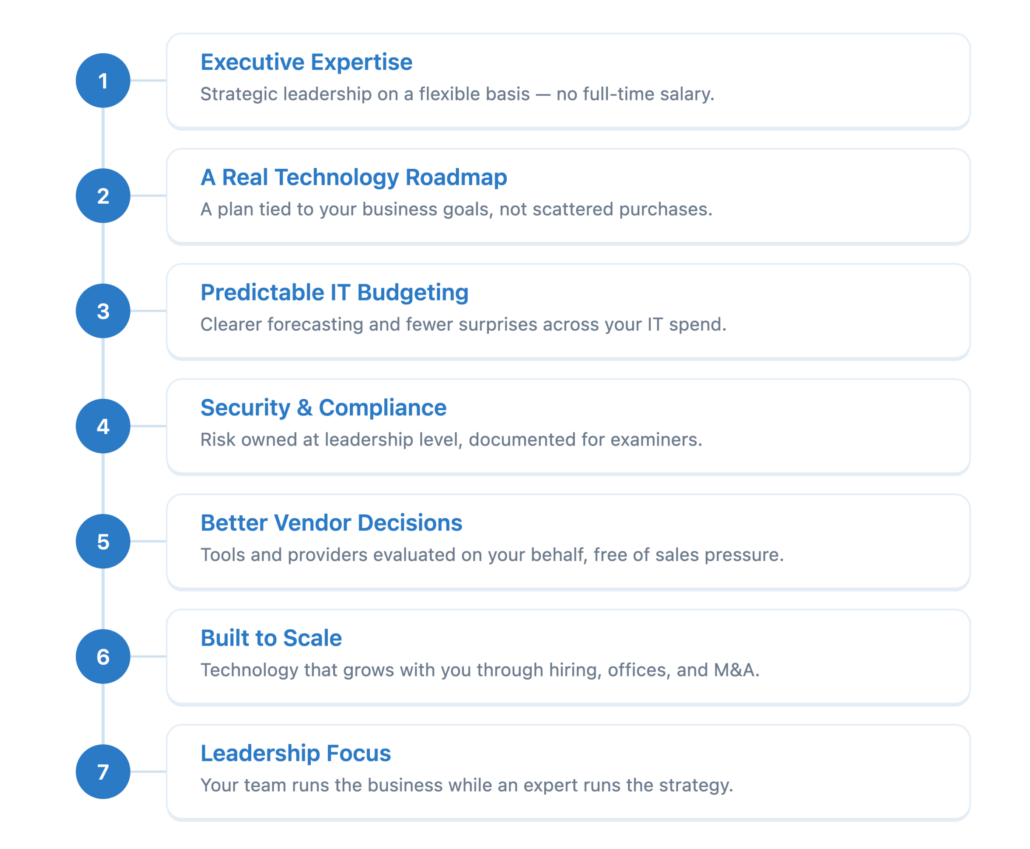
One of the key differentiators of working with DKBinnovative is access to a Virtual Chief Information Officer (vCIO)-  They are your dedicated strategic partner who helps align technology with your organization’s goals.

Your vCIO becomes an extension of your technology and leadership team. They take the time to understand your business challenges, long-term objectives, and operational priorities. From there, we develop a clear, ROI-driven IT roadmap that connects every technology initiative to tangible outcomes like cost savings, productivity gains, and scalability.

This isn’t a one-time consultation- it’s an ongoing partnership. Your vCIO conducts quarterly meetings with your team to review progress, analyze ROI, and adjust your technology strategy as your business evolves. At DKBinnovative, we don’t just maintain systems- we help drive your success.

Building an ROI-Driven IT Roadmap

A strong IT strategy requires a clear plan and that’s where DKBinnovative’s ROI-driven roadmaps come in. Working hand-in-hand with your vCIO, we assess your current technology posture, align initiatives with business goals, and create a phased investment plan that prioritizes impact and efficiency.

Each roadmap includes defined milestones, measurable outcomes, and quarterly reviews to ensure alignment as your business grows. This structured, collaborative process gives you full visibility into your IT journey and confidence that every investment supports your long-term success.

Focus 2026 Investments Where They Matter Most

Smart budgeting means focusing on the technology areas that provide the greatest impact. For 2026, that means doubling down on cybersecurity, optimizing cloud performance, and stabilizing IT operations through managed or co-managed services.

Cybersecurity is no longer optional. As cyber threats increase, prevention has become far more cost-effective than recovery. Our team delivers layered security with continuous monitoring, managed detection and response, and employee training that strengthens your first line of defense. Infrastructure & Cloud Optimization is another high-impact investment area. Many businesses overspend on underutilized cloud resources and don’t understand the current state of their infrastructure. We help right-size your environment, control costs, and ensure your business setup is secure, efficient, and tailored to your needs.

And for daily operations, our Managed and Co-Managed IT Services provide reliable, proactive support. Whether we fully manage your technology or work alongside your in-house IT team, our goal is the same. We provide predictable costs, fewer disruptions, and a technology environment that scales with your business.

Eliminate Surprise Costs Through Proactive Planning

Unexpected IT costs from something such as random hardware failures to outdated software and new licenses can throw off even the best budgets. That’s why DKBinnovative takes a proactive approach to technology management.

We track hardware lifecycles through our amazing procurement & deployment team to replace aging systems before they fail. We monitor software end-of-life timelines so upgrades are planned, not rushed. Regular cybersecurity assessments identify vulnerabilities before they become threats, and our comprehensive backup and disaster recovery solutions ensure business continuity no matter what happens. With proactive planning, your technology spending becomes predictable,and your IT infrastructure becomes a source of stability instead of constant stress.

Partnering with DKBinnovative for Predictable Growth

When you choose DKBinnovative, you’re not just getting an IT provider, you’re gaining a proactive partner invested in your growth. Our team of experts combines deep technical knowledge with business insight, helping you make informed, ROI-focused decisions that drive measurable results.

We provide predictable IT spending through our managed services model, deliver enterprise-grade security scaled for SMBs, and ensure your technology always aligns with your business vision. We are a company that grows with you and is continuously adapting and supporting your goals year after year.

Your Ultimate Guide to Cybersecurity Awareness

October is Cybersecurity Awareness Month, a time when organizations emphasize the importance of digital security. But in a world where the average cost of a data breach has surged to $4.67 million, according to IBM’s 2025 Cost of a Data Breach report, passive “awareness” is no longer enough. The threats facing your business are sophisticated, relentless, and constantly evolving. It’s no longer a matter of if you’ll face an attack, but when and how prepared you’ll be. 

That’s why this October, we’re moving beyond simple tips. We’re giving you the blueprint to build a robust, multi-layered defense strategy designed to protect your organization from the ground up. 

We will walk you through four essential layers of modern cybersecurity. Each section provides actionable advice you can use today and explains how a dedicated partner like DKBinnovative can help strengthen your defenses for tomorrow. 


Your First Line of Defense  

Your employees are a primary target for a cybercriminal and represent the most critical entry point to your digital assets. In fact, Verizon’s 2025 Data Breach Investigations Report (DBIR) found that 72% of all breaches involve a human element, most commonly through phishing, social engineering, or simple error. Attackers send cleverly disguised emails to enact Business Email Compromise (BEC) schemes, which the latest Internet Crime Report from the FBI’s IC3 revealed have caused over $16 billion in reported losses in the last year alone. 

Before You Click, Give it the S.L.A.M. Test 

Train your team to be skeptical of unsolicited emails by using this simple method: 

  • S – Sender: Look closely at the sender’s email address. Is it spelled correctly? Attackers often use look-alike domains (e.g., dkbinnovatlve.com instead of dkbinnovative.com). 
  • L – Links: Hover your mouse over any links before you click. The destination URL will appear in the bottom corner of your browser. If it looks suspicious or doesn’t match the context of the email, don’t click it. 
  • A – Attachments: Never open an unexpected attachment. If you weren’t expecting a file, verify with the sender through a separate channel (like a phone call). 
  • M – Message: Read the content carefully. Is there an unusual sense of urgency, a threatening tone, or poor grammar? These are classic red flags. 

From Liability to Asset 

Tips and one-off training emails aren’t enough to build a resilient defense. To truly create a strong “human firewall,” you need consistent and measurable training. DKBinnovative’s Security Awareness Training platform turns your employees from a potential liability into a security asset. Through simulated phishing campaigns and engaging video modules, we empower your team to become a vigilant, active part of your defense. 


Protecting Digital Entry Points 

If a malicious actor manages to steal a user’s password, they gain extensive access to your network. Weak, reused, or compromised credentials allow attackers to easily bypass many of your primary defenses. Once inside, they can move laterally through your network, escalate their privileges, and access sensitive data. 

Go Beyond the Password with MFA 

Strong, unique passwords are a start, but they are not enough. The single most effective thing you can do to secure your accounts is to enable Multi-Factor Authentication (MFA). MFA requires a user to provide two or more verification factors to gain access. This simple step remains incredibly effective; Microsoft data confirms that MFA blocks over 99.9% of account compromise attacks.

Managed Identity and Access  

Enforcing strong password policies and deploying MFA across every critical application can be a significant technical and administrative challenge. DKBinnovative’s Managed Identity & Access Management services take this burden off your shoulders. We implement and manage robust access controls across your organization, ensuring MFA is properly configured and monitored for suspicious login activity. 


 Proactive Threat Hunting 

Traditional antivirus software is effective at stopping known threats but is often blind to new and advanced attacks. Modern threats like fileless malware and zero-day exploits are designed to be invisible to basic antivirus protection. They can infiltrate your network and remain undetected for weeks or even months- a period known as “dwell time.” According to Mandiant’s 2025 M-Trends report, while the median dwell time has dropped to just 14 days, that’s still two full weeks for attackers to cause havoc undetected. 

Shift from Prevention to Active Detection 

 You can no longer rely solely on passive prevention. A modern security posture requires active threat hunting, constantly searching for signs of unusual or malicious behavior within your network. 

Your 24/7 Security Operations Center (SOC)  

You need constant visibility into your network activity. This is where our Managed Detection and Response (MDR) service comes in. Backed by our state-of-the-art, 24/7/365 Security Operations Center (SOC), our elite security analysts provide continuous monitoring. Using advanced Endpoint Detection and Response (EDR) tools, we actively hunt for suspicious activity, analyze potential threats in real-time, and neutralize them before they can escalate into a full-blown breach. 


Ensuring Business Continuity 

No defense is 100% impenetrable. In a cybersecurity crisis, the difference between a minor inconvenience and a catastrophic business failure is a well-documented and tested recovery plan. When ransomware strikes, every minute of downtime costs you money, productivity, and customer trust. 

Test Your Backups and Your Plan 

Having a data backup is essential, but a backup is only as good as your ability to restore. Do you know how long it would take to recover your critical systems? Is your backup data stored in a secure, isolated location where it can’t be encrypted by ransomware? 

Ensure Business Continuity  

DKBinnovative’s Managed Backup & Disaster Recovery (BDR) solutions are about more than just backups; they’re about business continuity. We provide automated, encrypted backups that are regularly tested for viability. In the event of an attack, we can rapidly restore your data and systems to ensure your operations continue with minimal disruption. We help you answer the critical question: “How fast can we get back to business?” 


 Cybersecurity is a Process, not a Project 

Building a comprehensive security program requires a strategic, layered approach. Cybersecurity isn’t a one-time setup; it’s a continuous process of management, monitoring, and improvement. 

Don’t wait for an attack to test your defenses. Let the experts at DKBinnovative conduct a professional evaluation of your current security landscape to identify critical vulnerabilities and provide a clear roadmap for improving your defenses. 


What Is IT Infrastructure Outsourcing & What Are Its Benefits?

why outsource IT infrastructure

Concerns about hidden costs, slow response times, or reduced oversight often give IT infrastructure outsourcing an undeserved bad name. In practice, the benefits of IT infrastructure outsourcing include stronger system stability, lower capital outlay, and consistent protection for servers, storage, networks, and cloud platforms.

“An experienced partner should extend your capabilities, not limit them. The right provider helps you achieve stability, security, and efficiency.”Peter Bertran, Chief Client Officer, DKBinnovative

Outsourcing infrastructure moves routine maintenance, monitoring, and upgrades out of your internal workload and into a structured service model. This approach cuts the risk of sudden hardware expenses, speeds recovery from outages, and gives businesses access to advanced tools that are costly to maintain in-house.

This article will define IT infrastructure outsourcing, explain how it differs from general IT outsourcing, and outline the steps that help organizations effectively capture these advantages.


What is IT Infrastructure Outsourcing?

IT infrastructure outsourcing is when an organization partners with an external provider to manage core technology systems such as servers, storage, networks, and cloud platforms. Instead of maintaining and upgrading this environment in-house, businesses rely on specialized teams who provide monitoring, maintenance, scaling, and security.

How is IT Infrastructure Outsourcing Different Than General IT Outsourcing?

While IT infrastructure outsourcing can be part of an IT outsourcing contract, it isn’t always in all cases. The key difference between the two is as follows.

General IT Outsourcing IT Infrastructure Outsourcing
Covers a broad range of functions, including IT helpdesk support, application management, and cybersecurity. Focuses specifically on the foundation of technology, including IT networks, servers, data centers, storage, and cloud platforms.


The Top Benefits of IT Infrastructure Outsourcing


Reduced Downtime

Downtime affects productivity, revenue, and customer trust. Infrastructure outsourcing provides 24/7 monitoring and proactive maintenance, which keeps servers and networks performing consistently. The result is fewer interruptions and faster recovery when problems occur.

Predictable Costs

Infrastructure ownership comes with unpredictable expenses such as emergency repairs or sudden hardware replacements. With outsourcing, these expenses become part of a stable monthly agreement. This model simplifies budgeting and reduces financial risk tied to infrastructure upkeep; it’s the top reason why 70% of companies that outsource do so.

Faster Recovery

When outages occur, outsourced providers use specialized monitoring platforms and automation tools to identify and resolve issues quickly. This reduces downtime compared to in-house teams that may lack dedicated staff for rapid response. Faster recovery helps businesses maintain continuity and protect operations from extended interruptions.

Stronger Security

Infrastructure-level security requires constant vigilance and expertise. Providers manage patching, network firewalls, and intrusion detection systems to close gaps that attackers target. By outsourcing, businesses gain access to security practices that are difficult and expensive to build internally.

This can have additional tangential business benefits since 48% of consumers say that they would not purchase from a company if they had cybersecurity concerns about their practices.


Find Out How We Maintain 98.39% Client Satisfaction

Read More


Lower Capital Outlay

Purchasing servers, storage, and networking gear requires significant upfront spending. Infrastructure outsourcing removes this burden by delivering these resources as a service. That’s because moving away from on-prem solutions has an average 2.3x lower total cost of ownership. Businesses can redirect capital toward growth initiatives while still benefiting from enterprise-grade infrastructure.

Enterprise-Grade Tools

Providers invest in advanced monitoring, automation, and reporting systems to manage client infrastructure effectively. These platforms deliver insights and proactive alerts that many organizations cannot afford to maintain on their own. By outsourcing, companies gain the benefits of these tools without direct ownership costs.

Improved Resilience

Outsourced infrastructure often includes disaster recovery planning, backup management, and redundancy. These measures reduce the risk of extended outages caused by hardware failure or unexpected events. Improved resilience means businesses can maintain operations even when disruptions occur.

Take a Closer Look at What Else You Can Get From an IT Partner


How to Approach IT Infrastructure Outsourcing


1. Assess Your Environment

The first step is to document your existing infrastructure, including servers, storage, and networks. This assessment should identify costs, recurring issues, and areas where performance does not meet expectations. A clear baseline helps determine which functions are best suited for outsourcing.

2. Set Clear Goals

Outsourcing works best when objectives are defined in advance. Goals may include reducing downtime, improving compliance, or lowering infrastructure spending. Clear targets make it easier to evaluate provider performance and measure success after implementation.

3. Choose Carefully

Not all providers specialize in infrastructure. Selecting a partner with demonstrated expertise in servers, cloud platforms, and networking is critical. Reviewing certifications, client references, and service history ensures the provider can deliver reliable infrastructure support.


infrastructure outsourcing


4. Transition of Infrastructure Control

You shift operational control of infrastructure systems (servers, storage, networks, cloud environments) from your internal team to the provider. This includes handing over monitoring tools, access credentials, configuration management, and system baselines. The provider takes over applying patches, upgrades, capacity planning, and infrastructure health monitoring consistent with the SLAs.

5. Integration & Validation

Once control is transferred, the provider integrates with your existing systems and tools (identity systems, virtual machines, storage arrays, etc.). They validate performance, security, and redundancy in the new setup. You run tests, failover drills, and performance benchmarks to confirm the infrastructure meets agreed standards before fully switching over.

Find Places to Outsource Your IT Infrastructure in The State of Texas
Irving Plano Frisco


Outsource Your IT Infrastructure With DKBinnovative

Handing over your infrastructure is a big decision. The wrong provider can leave you with hidden costs, slow response times, and security gaps. Choosing a partner with the right expertise protects your business and reduces those risks.

DKBinnovative specializes in managing critical infrastructure, including servers, networks, storage, and cloud environments. Our team provides 24/7 monitoring, proactive maintenance, and security controls that keep systems stable and compliant.

Contact us today to get started.

How DKB’s AI Strategy Puts Our Clients Ahead


The age of Artificial Intelligence is here, and it’s fundamentally reshaping the business landscape. For ambitious organizations, the real question isn’t if they should adopt AI, but how they can harness its power to gain a genuine competitive advantage- safely and strategically. The rush to integrate AI without a plan is creating significant, often unseen, vulnerabilities. We believe the most successful firms will be those who navigate this transformation with a partner that understands both innovation and security.

The Unseen Risks of Ungoverned AI

As employees independently adopt free and unvetted AI tools, a phenomenon known as “Shadow AI” begins to spread across an organization. This creates a minefield of business risks. Sensitive data from prompts and uploaded files—like confidential M&A documents or client financial records—can be leaked and absorbed into third-party models. Malicious actors can use sophisticated techniques to trick AI models into bypassing security controls or exfiltrating data.

These models can produce outputs that are confidently incorrect, leading to flawed decisions based on “hallucinated” data. All the while, uncontrolled access and untracked usage lead to unpredictable, spiraling costs. Without a deliberate strategy, the promise of AI quickly becomes a liability, exposing intellectual property, violating compliance mandates, and eroding client trust.

A Blueprint for Responsible Innovation

To navigate these challenges, a clear framework is needed. That framework is ISO/IEC 42001, the new international standard for AI Management Systems. This isn’t a restrictive set of rules, but a strategic blueprint for governing AI responsibly. It establishes clear policies, embeds risk management into the entire AI lifecycle, and demands the transparency and robustness that are essential for building sustainable, enterprise-grade AI solutions. Adhering to this standard isn’t just about mitigating risk; it’s about building a foundation for excellence and trust.

DKB’s Proactive and Governed Approach

At DKB, we don’t just react to technology trends; we build proactive strategies to leverage them securely for our clients. We build and manage secure, governed AI programs that balance breakthrough innovation with airtight control. This involves developing clear AI use policies, engineering secure architectures with robust data loss prevention, conducting rigorous risk assessments, and ensuring all solutions are aligned with frameworks like ISO/IEC 42001.

Our Strategic Technology Partner: Hatz.AI

A strategy is only as good as its execution, which requires the right technology. After a year of extensive evaluation and rigorous due diligence, DKB has selected Hatz.AI as our official secure AI platform. We did the homework so our clients don’t have to.

Hatz.AI stands apart because it was engineered from the ground up for enterprise security and control. It provides:†

  • A Multi-Model Advantage: The platform aggregates leading large language models (LLMs) into a single, secure interface. This allows for selecting the absolute best model for a specific task—be it data analysis, content creation, or code generation—without being locked into a single provider’s ecosystem.
  • Fortress-Like Security: All data is encrypted both in transit and at rest. This means your sensitive prompts, proprietary knowledge bases, and confidential outputs are protected.
  • Secure, Isolated Workspaces: Hatz.AI enables the creation of dedicated workspaces for different teams or functions. This contains data flow, controls access, and eliminates the chaos and risk of “Shadow AI.”
  • Auditable, Task-Specific Agents: The platform allows for training specialized AI agents on your curated data for specific business processes. This makes complex work faster, more consistent, and fully auditable—a critical requirement for regulated industries.

AI in Action

For firms in demanding fields such as  Investment & Professional firms,  the applications are transformative. Generic AI tools won’t cut it, but a secure, governed platform can become a significant force multiplier.

Imagine being able to:

  • Supercharge Due Diligence: For Investment firms, AI can accelerate the deal-making process by securely analyzing thousands of pages from a virtual data room in minutes. It can summarize key findings, identify risks in contracts, and flag anomalies in financial statements, allowing your team to focus on high-level strategy instead of manual review.
  • Automate Compliance and Reporting: For Accounting and Compliance teams, AI can cross-reference new tax legislation or financial regulations against hundreds of client structures to instantly identify gaps and required actions. It can assist in drafting internal control policies and generate detailed audit trails, ensuring you remain ahead of complex regulatory demands.
  • Enhance LP and Client Communications: Train a secure knowledge assistant on your proprietary fund documents or client engagement letters. This allows for instantly generating accurate summaries for Limited Partner reports or answering client questions with consistency and precision, all while ensuring confidential data never leaves your secure environment.

Work with an MSP That Puts You Ahead of the Curve

The future of professional services isn’t just about managing IT; it’s about leveraging technology for a decisive strategic advantage. The thoughtful integration of AI is central to that future.

If you are looking for a Managed Services Provider that embeds next-generation AI securely into its services to deliver elite performance, heightened security, and a real competitive edge, DKB is ready to lead the way.

Interested in working with an MSP that utilizes AI for top-notch security and operational excellence? Reach out now to learn how DKB can help your firm build its future.

Here’s How to Avoid Managed IT Service Challenges

Managed IT Service Challenges


With approximately 8,000 managed IT services providers (MSPs) in the USA alone, there will doubtless be some that are better than others. However, it’s also important to recognize that many managed IT service challenges aren’t a result of the provider’s quality. Sometimes, it simply means that MSP wasn’t the best fit for your organization.

“Choosing an MSP isn’t as simple as choosing a ‘good’ or ‘bad’ one; it’s about choosing the one that makes the most sense for your needs and goals.” – Mike Walsh, Chief Operating Officer, DKBinnovative

The problem is that detecting MSPs who will be a bad fit for you is less obvious than detecting poor quality ones. It’s easy to see who underperforms. It’s not as easy to see who has different goals and values compared to yours.

That’s what this article will help you learn. We will go over the steps that you can take to zero in on what you want out of an MSP, and the challenges that finding a good fit will help you avoid.

6 Managed IT Service Challenges You May Face With a Poor Fit

1. Misaligned Business Priorities

Conflict can arise if your priorities don’t match. For instance, an MSP might push for rapid technology adoption while your team prioritizes stability. In other cases, the MSP may stress cost savings when your leadership values growth and scalability.

This mismatch leads to frustration on both sides. The provider may see your organization as resistant to progress, while you may feel pressured into decisions that do not fit you.

2. Communication Style Gaps

Some MSPs deliver long technical reports. Others share short updates that lack detail. If the style does not match how your staff processes information, important details may be missed. The result is confusion about project status, unclear expectations, and strained relationships between your team and the provider.

Hear From Friendly IT Support Staff in Just 3 Minutes on Average! No More Managed IT Service Challenges!

TALK TO DKB

3. Different Risk Tolerance

Organizations vary in how much risk they are willing to accept. A provider with a strict, compliance-heavy mindset may overcomplicate simple processes if your company operates with more flexibility. On the other hand, a provider with a more relaxed approach may leave leadership feeling uneasy.

These differences create tension around budgeting, project timelines, and even day-to-day operations.

4. Cultural Incompatibility

Company culture extends to values, pace, and decision-making style. If your MSP works in a rigid, policy-driven environment while your team values agility, the relationship will struggle. The opposite is also true: a casual provider may frustrate leaders who expect formal processes. Lack of collaboration is actually why 80% of outsourcing relationships fail.

5. Misaligned Service Scope

Some MSPs shape their services around specific industries or company sizes. If your organization does not fall into that focus, the provider may underdeliver in the areas you need most, even while performing well in other areas.

6. Conflicting Growth Expectations

Your MSP may expect to grow with you, while your leadership may view them as a short-term partner. Conversely, your business may plan for aggressive scaling, and the provider may not be structured to expand at the same pace. These conflicting views stall projects and create planning disputes.

What Else You Should Know to Avoid Managed Service Challenges

How to Truly Zero In on What You Want Out of an MSP

Define Business Goals

Start with what your organization wants to achieve. If growth, stability, or cost control are your top priorities, name them clearly. An MSP can only align with your direction if those goals are on the table from the start.

Map Internal Pain Points

List the areas where your team struggles most today. Whether it is slow response times, recurring outages, or ensuring compliance, knowing where the pain lies makes it easier to judge who can relieve it.

Identify Long-Term Needs

Think beyond your immediate projects. Consider whether you expect significant growth, restructuring, or regulatory changes in the next few years. An MSP that fits your future plans will be more valuable than one that only solves today’s challenges.

Here is a graphical example to show you what this means (using a 5-year example).


IT Managed Service Challenges

  • Bottom axis (Years Ahead): Time, starting today and looking out over the next 5 years.
  • Side axis (Business Needs Supported): How well the MSP keeps up as your company grows or changes.

Red Line (Current-focused MSP):

  • Works fine for today’s needs.
  • Stops improving after the first year or two.
  • This provider is good in the short term but won’t keep up as demands increase.

Blue Line (Future-focused MSP):

  • Meets today’s needs just like the red line.
  • Keeps climbing year after year.
  • This provider adjusts as your company expands, restructures, or faces new rules.

This chart shows why it’s smarter to choose an MSP that supports your future plans, not just today’s projects.

Outline Support Expectations

Think about what support looks like for your team. Some organizations expect round-the-clock access, while others need structured escalation paths. Clarifying this helps you see which providers can meet the level of service you require.

Weigh Industry Expertise

Some MSPs specialize in certain industries. If compliance or niche software plays a large role in your operations, you will need a provider with experience in those areas. Without that, their support may not extend to the tools or rules you depend on.

Determine Budget

Every organization has limits on what it can spend. Defining a realistic budget helps you focus on providers that can deliver value within those boundaries rather than overselling or underdelivering.

Find a Cutting-Edge IT Service Provider Without The Managed IT Challenges

Find Out If DKBinnovative is The MSP Who Will Prevent Your Managed Service Challenges

An MSP can help you streamline operations. Some research shows that working with one can even increase your overall efficiency by as much as 60%. However, these benefits will only appear of your provider’s service delivery matches your needs.

At DKBinnovative, we’re proud of our ability to adapt to a wide range of clientele. We listen to your needs and cater our services to them. Our goal is to assist you with processes that you know work, not to push you into a system that doesn’t fit your business model.

Reach out today to tell us about what you want to achieve!

An Exploration of 8 Key Types of Managed IT Services

Types of Managed IT Services


In a previous blog post, we explored what managed IT services are and why they’re beneficial. However, managed service providers (MSPs) offer different types of managed IT services. Most will offer more than one type, but not all will offer all types.

“You may have heard about the benefits of managed IT. While these benefits are valuable, there is a catch. That catch is your need to select the right types of services to meet your needs.” Mike Walsh, Chief Operating Officer, DKBinnovative

For this reason, you need to recognize the differences between different types of managed services. Knowing these differences can help you choose an MSP who is more likely to meet your needs. Once you understand your business goals, you can explore various types of managed services that can help you meet them.

That’s what this article is here to help you understand. We will explore 8 key types of managed IT services, how they can benefit your operations, and what the best use case for each service offering is.


8 Types of Managed Services


1. Co-Managed IT Services

Co-managed IT services let you combine your internal IT team with outside support from a managed services provider. The MSP fills gaps in expertise, staffing, or availability while still giving the internal team control over day-to-day IT tasks.

This model is a cost-effective option for companies that have IT staff but need help with scaling, specialized skills, or 24/7 coverage. It’s also a good fit if your team is falling behind on strategic initiatives due to constant break/fix work.

This service contrasts with the typical MSP model that involves full outsourcing. Filling in skill gaps is the usual use case for choosing co-managed over fully managed IT, but it’s not the only one. Here are some more example use cases.

Fully Managed IT Co-Managed IT
No internal IT staff is available or planned An internal IT team exists but needs extra support
The business wants to fully outsource IT operations The team handles daily tasks but needs help with larger projects
Leadership wants to offload all IT responsibilities The IT team needs help managing advanced infrastructure or security
There’s no time or budget to build and retain an in-house team Current staff lacks specific certifications or deep expertise in certain technologies
The company needs consistent IT coverage without managing shifts or coverage gaps In-house staff is overloaded with support requests and can’t focus on improvements
Business requires a single point of accountability for all IT services The team wants to maintain control while accessing scalable resources when needed
The company prefers a turnkey solution with predictable pricing The business has seasonal needs that temporarily exceed internal capacity


2. Virtual CIO (vCIO) Services

Virtual CIO services give companies access to executive-level IT guidance without hiring a full-time chief information officer. A vCIO helps set long-term IT strategies, plan budgets, align technology with business goals, and oversee major projects or decisions.

vCIO services are ideal for small to mid-sized businesses that don’t have in-house strategic IT leadership but still want to make smart, forward-looking tech decisions. It’s especially useful during periods of rapid growth, mergers, or while replacing outdated systems.


3. Managed Security Services

Some providers specialize in data protection as their sole business model. These providers are known as managed security service providers (MSSP). However, many MSPs also offer powerful threat detection and response capabilities that are on par with MSSPs.

Any organization of any size or in any industry can benefit from managed security services, whether from an MSP or MSSP. Cyber threats are evolving rapidly, but organizations that trust an expert partner with their cybersecurity lower security costs by 27% and detect emerging threats 76% faster.

Minimize Downtime by Minimizing Disruptions

Get 24/7 System Monitoring


4. Cloud Management Services

Cloud management services help businesses run and optimize their cloud computing platforms. These services include cloud migration, cost tracking, security controls, performance monitoring, and day-to-day management of hosted applications or services.

Businesses moving off legacy systems, expanding into remote work, or adopting SaaS tools benefit from this service. It’s especially useful for teams that don’t have cloud expertise or need help managing spending across multiple platforms like Microsoft Azure, Amazon Web Services, or Google Cloud.

Furthermore, this type of service can also simply be a way to free your internal team from the burden of managing your cloud infrastructure.


5. Compliance & Risk Management Services

Compliance and risk management services help businesses meet regulatory requirements and manage operational risks related to IT systems. The MSP reviews policies, systems, and user behavior to identify gaps and support documentation efforts.

Having this help can both reduce your risk of mistakes and expedite the process. For instance, CloudSecureTech notes that CMMC certification can take 6 to 18 months to complete. This is a long time to wait if you need that certification for certain business deals.

While you mustn’t rush the process to the point where you make careless mistakes, the help of an MSP can make it happen faster.

Learn More About How The Right IT Partner Could Help You


6. Device Lifecycle & Infrastructure Management

Device and infrastructure management covers the full life of IT assets. The MSP keeps inventory records, standardizes configurations, and monitors health and performance. This service also includes help desk support for device issues, warranty tracking, vendor coordination, and upgrade planning.

Having this service is particularly important for growing companies that need consistency across remote teams, rely on hybrid work models, or don’t have time to manage aging hardware and infrastructure on their own.


7. Patch Management & System Updates

Patch management covers the testing, scheduling, and installation of security patches and system updates across a business’s devices and software. The MSP tracks new releases, applies them in a controlled way, and verifies that updates don’t cause system conflicts.

Businesses with limited IT staff or those using a wide mix of applications and operating systems benefit the most. It’s also important for any company under pressure to prove they’re actively reducing risks tied to outdated software.

Types of Managed Services


8. Managed Backup & Disaster Recovery (BDR)

Most organizations understand the value of regularly backing up their data. The problem is that many data backups are not tested. 25% of organizations test their data backups once a year or less, which means they are at risk of the backup not working when it’s truly needed.

The right MSP can take on this task on your behalf. The MSP sets the backup schedule, stores the data in secure locations, and tests recovery plans on a regular basis. The goal is to recover systems quickly with minimal data loss and avoid extended interruptions to business operations.

This service is essential for any company that can’t afford data loss or long periods of downtime. It’s especially valuable for industries with service-level agreements (SLAs), sensitive customer data, or strict uptime requirements.

Find The Perfect Balance of IT Services From a Texas-Based IT Provider
Plano Frisco Irving


Enjoy All 8 of These Different Types of Managed IT Services From DKB

As mentioned, not all MSPs will offer all types of managed IT services. This article also only listed 8 of all the different types out there. However, if you feel like these 8 services could all benefit your organization, an MSP that provides them all is available.

That MSP is DKBInnovative. Our team will help yours increase operational efficiency by optimizing your technology’s functionality through real-time monitoring and support. Choosing our services ensures that you always have a team on hand who is ready to help you with your next step.

Reach out to book your consultation today!

WARNING! North Korean IT Worker Threats

The conversation around cybersecurity typically centers on ransomware, phishing emails, and vulnerabilities in outdated software. But a new threat is emerging, one that bypasses your firewall and walks through the front door: fake IT workers posing as remote freelancers.

On July 23, 2025, the FBI, in coordination with CISA and the U.S. Department of State, issued an official Public Service Announcement warning that North Korean operatives are actively targeting U.S. companies by posing as IT professionals. These state-sponsored actors infiltrate businesses by blending into remote workforces, often using freelance platforms, fake resumes, and even deepfake-enabled video interviews to obscure their identities. Once embedded, they can exfiltrate data, deploy malware, or use company infrastructure as a springboard for larger attacks.

This isn’t theoretical and it’s not limited to major enterprises. It’s already happening in businesses across the country, and many never realize it until it’s too late.

A recent Politico investigation uncovered the case of Christina Chapman, an Arizona woman who unwittingly helped establish a “laptop farm” on behalf of North Korean hackers. Hundreds of devices were used to simulate U.S.-based access points, making it appear as though these workers were logging in from inside the country. In reality, they were remote operatives channeling through compromised systems, some embedded within companies who never asked the right questions during the hiring process.

These are not lone actors. According to KnowBe4’s breakdown, these operatives come with polished resumes, legitimate references, and experience that looks credible on paper. In one case, the fraudster participated in multiple interviews some involving fake documentation, others using video feeds manipulated with deepfake technology. Their approach was sophisticated, persistent, and completely plausible.

The issue isn’t just access. It’s about trust. When these individuals get hired, they’re

granted access to critical systems, proprietary code, and confidential information. Their goal isn’t short-term financial gain, its long-term access, quiet persistence, and the ability to gather intelligence or launch secondary attacks. As The National Law Review explains, “Even companies with limited data may unknowingly enable sanctions violations, compromise clients, or become launching pads for attacks on larger firms.”

And the risk is greater for companies with hybrid or fully remote workforces, particularly those relying on external staffing platforms or offshore talent. Without stringent hiring practices, geographic access controls, or ongoing access monitoring, organizations may be granting administrative privileges to hostile actors without realizing it.

At DKBinnovative, we’re urging our clients and industry peers to treat third-party IT labor with the same scrutiny you would any critical vendor or internal team member. It’s no longer enough to ask for a resume and conduct a quick video call. Businesses must implement multi-layered verification methods, enforce strict geo-restrictions, and evaluate every remote login point for authenticity. Real-time device fingerprinting, ID validation, and location-based controls are not just nice-to-haves they’re now necessary safeguards.

We often tell our clients: cybersecurity isn’t just about technology. It’s about decisions. The decision to hire. The decision to trust. The decision to verify.

This new threat vector changes the calculus of risk management in IT. It’s not about whether a firewall is patched or if your backups are up to date, it’s about who you’re letting in, and what they might be doing once they gain your trust.  Our team can help assess the hidden vulnerabilities in your access stack and protect your environment before someone uses your business as their next launchpad.

How to Choose a Managed IT Service Provider Who Does More Than Fix Problems

How to Choose a Managed IT Service Provider


Choosing a managed service provider (MSP) can be a big decision. Most MSPs offer long-term service level agreements (SLAs), so you want certainty that they will be trustworthy. That’s why you must focus on how to choose a managed IT service provider that will do more than simply fix your current IT challenges.

“It’s easy to get caught up in what you want solved immediately. While there is value in finding someone who can solve these issues, you must be mindful not to neglect your future needs for the sake of your current challenges.” Mike Walsh, Chief Operating Officer, DKBinnovative

Focusing too much on a potential MSP who can simply solve what needs to be solved now puts you at risk of choosing someone who you’ll eventually outgrow. What you need today may not reflect what you will need tomorrow. So, you must balance your short- and long-term needs when you choose your MSP qualifying questions.

No one can predict the future, so it who can evolve as your business grows. The rest of this article will show you how to find t’s impossible to truly ask about your future business requirements. However, what you can do is seek an adaptable MSPhat MSP.

What Your Managed Services Vendor Selection Criteria Should Be If You Want an Adaptable Partner


Modular Service Packages

Look for offerings you can bolt on or remove without contract rewrites. Modular design lets you adopt new tools/services or drop unused ones with little downtime. Downtime costs an average $137 per minute for small-to-mid-sized businesses. You certainly don’t want a lack of strategic alignment to be the cause.

Flexible Storage Capacity

Ask whether the provider can add or reduce server or storage space within 4 hours. Quick changes keep systems steady during traffic spikes. That speed proves the MSP scales with you without long waits.

Plus, analysts estimate that about 10 million unused servers lock up $30 billion in hardware, based on a $3,000 price tag per unit. So, fast storage flexibility also helps you save money.

Cloud Services Expertise

Deep cloud knowledge lets the MSP build scalable architectures that expand without physical limits. It also reduces lead times when your staff needs new workloads online. Furthermore, cloud expertise means better cloud-based disaster recovery plans.

Resolve 78% of Your IT Issues in Just One Call

Find Out How


Multi-Site Support Capabilities

It’s estimated that around 2 million multi-unit establishments exist in the United States. So, there is a good chance that you are one of them. If so, verify that the MSP maintains service delivery standards in each region where you operate. Multi-site abilities allow for fast onboarding of new offices with consistent policies. This protects the user experience as your business operations expand.

Growth Forecasting

Request sample reports that project CPU, memory, and internet traffic for 12 months ahead. Accurate forecasts guide timely upgrades before resources run thin. Planning protects performance as demand rises.

Managed Services Questions to Ask to Pinpoint These Needs

While there are certain technical questions to qualify any MSP, there are also specific questions that you can ask about scalability. These questions should go beyond simply asking, “can your services scale with our business growth?” Almost every MSP will simply answer “yes” to that question, whether it’s completely true or not. Instead, ask about these factors to get a good answer.

Growth Strategy

Ask how the MSP plans to grow its support team as clients scale. A provider that relies on the same small crew for all clients may run into service delays as demand rises. You want to hear clear steps for hiring, training, and expanding technical roles when needed.

Onboarding Timelines

Ask how long it typically takes to bring a new location or department online. The answer should include timeframes, steps, and past examples. A provider with established processes in place will have no trouble giving you specifics.

A typical MSP onboarding process follows these steps.

Step What’s Involved
1 Discovery Gather details about your infrastructure, systems, vendors, and existing pain points. Includes interviews with key staff and documentation review.
2 Environment Assessment Perform audits on hardware, software, network setup, security controls, and licensing. Identify risks or unsupported systems.
3 Planning Build a transition plan that includes timelines, communication protocols, and any phased rollouts. Outline priorities based on business impact.
4 Documentation & Access Secure administrator credentials, network diagrams, IP addresses, and system configurations. Set up password vaults and asset tracking.
5 Tool Deployment Install remote monitoring agents, antivirus, backup systems, and other required tools. Test each deployment for functionality.
6 Support Setup Configure service desk routing, escalation paths, and response time expectations. Train staff on how to submit tickets and what to expect.
7 Knowledge Transfer Review documentation with support staff and walk through unique processes, systems, or policies for your organization.
8 Go-Live Begin full-service support. Monitor for issues, validate backups, and confirm access to all critical systems.

Internal Tool Limitations

Ask what internal platforms the MSP uses to manage clients and whether those tools have user or data limits. Some providers hit a ceiling with older systems. You need to know that the tools supporting your IT won’t break down as your team or infrastructure grows.

Client Size Transitions

Ask what percentage of their clients have outgrown the MSP (or grown with them) and what adjustments were made. Their answer will tell you if they’re used to evolving with companies or if they mainly serve static environments. Look for stories of change, not just retention.

Managed Services Vendor Selection Criteria

Project Load Balancing

Ask how many large-scale projects the MSP can run at once. If their team gets stretched thin after just one or two rollouts, that’s a red flag. A capable partner will explain how they divide resources to keep both day-to-day support and project timelines on track.

Learn More About What You Can Gain From Managed IT Services

Escalation Flexibility

Ask how their escalation process changes as ticket volume increases. Some MSPs use static escalation chains that slow down under pressure. Look for answers that show dynamic workflows and options to reroute tasks when volumes spike.

Long-Term Tech Planning

Ask how they help clients revise IT roadmaps as business priorities shift. A good answer includes regular reviews, planning sessions, and clear documentation. It shows the MSP won’t just stick to a plan that no longer fits your needs and impedes your business continuity.

Custom Workflow Support

Ask if they’ve created custom processes or integrations for specific client needs. If they say yes, ask for examples. A provider who tailors their services is willing to adjust operations, not just offer the same setup to everyone.


Explore Your IT Service Options in The State of Texas
Irving Plano Frisco


Find Out If DKBInnovative Fulfills Your Managed IT Services Checklist

Scalability is an important factor when it comes to choosing a managed IT service provider, but it’s not the only one. You also need to consider how your business operates, what types of IT tools you use, and where your internal skill gaps are. Once you know that, you can use it to guide your team toward the ideal partner.

Find out if DKBInnovative is the partner for you. Our team can reduce your recurring IT issues by 40%, which is part of why we’ve earned a 98% satisfaction rating. We can show you how to reduce your risks of cyber threats and your risks of IT system performance issues.

Contact us today to find out how.

Sales Number
(888) 295-0677

Support Number
(888) 352-4832

(888) 352-4832
[email protected]

1701 Legacy Dr, #1450
Frisco, TX 75034